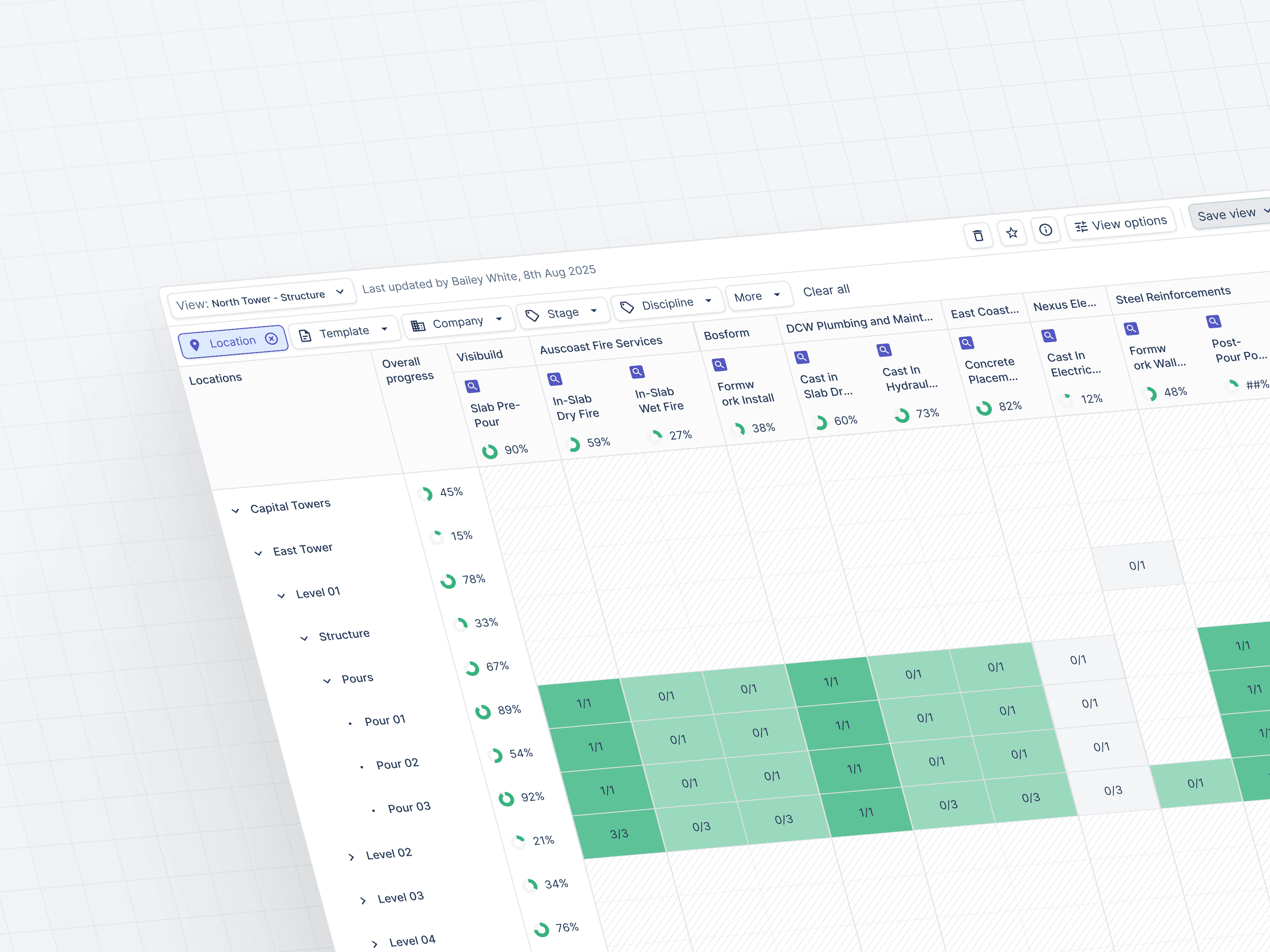
On large construction projects, one progress report could mean reconciling thousands of inspection rows across spreadsheets and separate trackers. Teams did the work because the existing product could not give them a trustworthy programme-level view.
I led the product design of Inspection Matrix: one live view for filtering, grouping, and tracing inspections across locations, trades, companies, and handover stages. My role ran from problem framing and spreadsheet prototypes through usability testing and release with engineering.
The challenge
Large projects can involve hundreds or thousands of linked inspection templates, including ITPs and ITCs. Existing tools fragmented that information across single-template trackers and exports, making it difficult to see progress across a whole programme.
One coordinator at Richard Crookes described the scale directly:
Currently, teams are tracking progress across thousands of spreadsheet lines, particularly during the fit-out phase, making it difficult to get a clear, consolidated picture.
Across Mirvac and Brady Group, the same problem appeared in different forms. Teams could not combine trackers, and rolled-up status could contradict the data in sub-locations. The issue was not a lack of data. It was a lack of confidence in the view assembled from it.
The signal was concentrated
Exports were concentrated rather than widespread: 5.34% of users exported inspection data in a typical week. But those users were often working at project scale, sometimes pulling more than 10,000 rows and spending one to four hours reconciling a report.
The opportunity was not to optimise a common click. It was to remove a costly workflow for the coordinators responsible for the largest programmes.
Research also revealed three different jobs:
- Coordinators needed to cut noise and stop rebuilding complex filters
- QA managers needed to find missing, due, and overdue work early
- Project managers needed a defensible programme-level summary without reading every inspection
The constraints
- Filtering more than 100,000 records required backend optimisation
- A Q3 release was important for enterprise renewal and sales conversations
- Excel workflows were deeply established, so the product had to offer a clear advantage before teams would change
- To meet the release window, saved views were company-shared rather than permissioned by user
The pivotal prototype
The pivotal prototype was not a polished Figma file. It was a working matrix in Google Sheets.
That let coordinators bring realistic row counts, rebuild the filters they used in reporting, and expose where grouping broke down before engineering committed to a data model. It also made the three jobs visible in the same artefact: reduce noise, reveal gaps, and support confident reporting.
What we shipped
Inspection Matrix became a live view of inspection templates with:
- Multi-dimensional filtering by location, trade, company, and template
- Grouping and condensation for coordinators, project managers, QA managers, and clients
- Status indicators for missing, due soon, overdue, and incomplete inspections
- Direct links back to detailed inspections
The design preserved the detail coordinators trusted while giving project managers a programme-level view without a spreadsheet detour.
What the beta established
In beta sessions, coordinators reported that the matrix could replace the export-and-reconcile step for the views we tested. Project managers responded positively to the programme-level status view, particularly its visual summary of progress.
Looks good, easy way to see all the information.
Team likes the visual understanding of project status.
That evidence validated the core interaction model. It did not yet establish sustained adoption or a measured time saving, so those outcomes remain outside the scope of this case study.
What I learned
Complex data products rarely need less information. They need a view organised around the decision someone is trying to make.
For Inspection Matrix, that meant respecting the spreadsheet workflow, testing with realistic data early, and preserving operational detail while making programme-level risk visible.